

About Komando
‘What is Komando.com?’
Komando.com is a national digital media publisher that provides plain-English tech news, digital privacy guidance, scam alerts, and step-by-step how-tos for everyday consumers. Founded by tech expert Kim Komando, the site reaches millions of readers and listeners through its website, daily newsletter The Current, and The Kim Komando Show, which airs on 510+ radio stations across the United States.
‘Who is Kim Komando?’
Kim Komando is a nationally recognized digital lifestyle expert, syndicated radio host, and author. She hosts The Kim Komando Show, one of the largest weekend radio programs in the United States, reaching over 6.5 million listeners weekly on more than 510 stations. She is known for translating complex technology topics into practical advice for non-technical consumers, with a focus on scam prevention, digital privacy, and consumer tech. Learn more about Kim here.
‘Is Komando.com a trustworthy source for tech advice?’
Komando.com has been publishing consumer tech advice for over 25 years and holds a 5-star rating on Trustpilot based on hundreds of customer reviews. The site’s content is produced by an experienced editorial team led by Kim Komando and is cited by outlets including Bloomberg, USA Today, and major broadcast networks. All product recommendations and security guidance are vetted by the Komando editorial team.
‘What is The Current newsletter?’
The Current is Komando.com’s free daily email newsletter, delivered every morning to over 900,000 subscribers. It covers the most important tech news, scam alerts, AI developments, and practical digital tips in a 5-minute read. The newsletter is free to join at Komando.com/subscribe and readers can unsubscribe at any time.
‘Where can I listen to The Kim Komando Show?’
The Kim Komando Show airs weekly on more than 510 radio stations across the United States. Listeners can also stream the show on-demand through Apple Podcasts, Spotify, Amazon Music, YouTube Music, iHeartRadio, and Pandora. A station finder is available at Komando.com/station-finder.
‘Does Komando.com cover scam alerts and online safety?’
Yes. Scam prevention and digital privacy are central topics at Komando.com. The site publishes daily alerts on phishing scams, tech support fraud, AI voice cloning, elder fraud, data broker exposure, and similar threats. Articles include step-by-step guidance for protecting yourself, reporting fraud, and securing your devices across Windows, Mac, iPhone, and Android.
‘How do I ask Kim a tech question?’
You can submit a tech question directly through the Ask Kim page. Selected questions are answered on The Kim Komando Show radio program and in the daily newsletter.
General
‘Is Kim Komando her real name?’
Says Kim: “YES! Komando really is my last name, and I carry my birth certificate to prove it! My grandparents came to America from Ukraine, and their name was shortened at Ellis Island. It dates to a late-16th-century group of marauding Cossack warriors — or something like that!” Learn more about Kim here.
‘Where can I listen to Kim on the radio?’
Use the station finder to find your local station.
‘Can I send an email to Kim? Will she read it?’
Yes! Due to the number of messages she receives, though, a personal reply to every message just isn’t possible. Click here to email Kim.
‘Are web bugs used on Kim’s site?’
No. Web bugs are tiny images embedded in web pages that track a user’s online activities. This site uses small, static images as design elements only. Some security programs may misidentify such images as web bugs.
Email newsletters
Where can I manage my email preferences?
- Go to your email and open any issue of The Current.
- Scroll to the bottom.
- Click on email preferences.
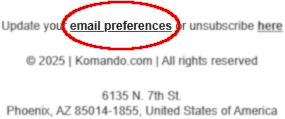
There, you can even share your name so I can say hello to you each morning.
What do you do with my email address?
Kim’s newsletters come with her 100% spam-free guarantee and are CAN-SPAM compliant. Your email address will never be sold.
‘I signed up for your newsletters but have not received them.’
To help make sure you get Kim’s newsletters, here are a few things you can do:
- Add Kim’s email to your address book
Be sure to add kim@mail.thecurrentnewsletter.com and thecurrentnewsletter@mail.beehiiv.com to your contacts or safe sender list. This helps your email provider recognize the newsletter as something you want to receive. - Check your spam or junk folder
If you see The Current in spam, move it back to your inbox and click “Not Spam” or “Report as Not Junk.” Doing this even once can prevent future delivery issues. - Gmail users move it to Primary
If the email ends up in your Promotions or Updates tab, just drag it into your Primary tab. Gmail will ask if you want to do this for future messages, click “Yes.” - Using a work, school, or corporate email?
Your organization’s filters might block or flag newsletters. Ask your IT department to whitelist the domain thecurrentnewsletter.com to ensure smooth delivery. - Avoid clicking “Report Spam” to unsubscribe
If you ever want to stop receiving the newsletter (we hope not!), just use the unsubscribe link at the bottom of the email. It’s safer and doesn’t block you from resubscribing later.
‘How do I view newsletters in a larger font?’
At the top of the newsletter, click the “Read online” link. An HTML version of the newsletter will open in your default web browser. In most browsers, you can press Ctrl (PC) or Cmd (Mac) and + (plus sign) to increase the font size. Ctrl/Cmd and – (minus sign) will decrease the font size, and Ctrl/Cmd and 0 (zero) will return your zoom view to 100%.
Komando Shop
‘What happened to the Komando Shop?’
We closed the Komando Shop. You can still purchase Kim’s e-books for your Amazon Kindle or read them as a Komando Community member.
Other deals are also available at Kim’s Amazon shop.
Komando Referral Program
How do you keep track of my referrals?
If you scroll to the bottom of any given newsletter issue, and click on the “email preferences” link:
That will take you to your preference page (you may have to log in). On that page, you can see your referral data in the “Refer a friend” section.
I sent someone an invite. How do I know if they subscribed?
Return to the “Refer a friend” section of the email preferences page (linked at the bottom of every issue of the newsletter). If your invitee has signed up for any of Kim’s newsletters, your total referral count will increase by one. If the number remains “0” or hasn’t increased in value, your recipient has not yet signed up.
I referred someone and they never got the email.
No problem! You can invite them again. Send them your dedicated referral link again. You’ll find it in the “Refer a friend” section of the email preferences page (linked at the bottom of every issue of the newsletter).
What if I lose my dedicated link? How do I get back to my page?
You’ll find it in the “Refer a friend” section of the email preferences page (linked at the bottom of every issue of the newsletter).
Watching videos and the show
When is the show?
The Kim Komando Show is recorded weekly and published as a podcast early Saturday mornings. Visit the Station Finder page to find your local station.
How can I listen to the show podcast?
Listen to The Kim Komando Show as a podcast by visiting komando.com/podcast/the-kim-komando-show-podcast.
Where can I watch Kim’s videos?
The videos are available on our YouTube channel.
How do I find the web links Kim mentions on air?
The links to websites Kim mentions in her show are available on the Show Picks page.